Showing posts with label properties. Show all posts

Scala : easily load an parse configuration files

There are a lot of ways to handle configuration files in a Scala program; my favorite one is to use TypeSafe's Config project

This library scans the CLASSPATH for a predefined set of configuration files in different formats

Using it it's pretty straightforward so let's get to it :

1.- Add your dependency to sbt
libraryDependencies += "com.typesafe" % "config" % "1.2.1"
2.- Loading the configuration file

//load the configuration file from the classpath
val conf = ConfigFactory.load

The convenience method ConfigFactory.load() loads the following (first-listed are higher priority):

  • system properties
  • application.conf (all resources on classpath with this name)
  • application.json (all resources on classpath with this name)
  • application.properties (all resources on classpath with this name)
  • reference.conf (all resources on classpath with this name)

The idea is that libraries and frameworks should ship with a reference.conf in their jar. Applications should provide an application.conf, or if they want to create multiple configurations in a single JVM, they could use ConfigFactory.load("myapp") to load their own myapp.conf. (Applications can provide a reference.conf also if they want, but you may not find it necessary to separate it from application.conf.)

3.- Reading the configuration file values
//retrieve configuration files values
val remoteIp = conf.getString("server.ip")
val remotePort = conf.getInt("server.port")

That's it for today; have fun!

Intellij change default encoding for properties and message bundle files to utf-8

By default IntelliJ IDEA encodes Properties and Message bundle files using the System's default encoding (e.g. ISO-8859-1)

In my experience this is problematic since most frameworks out there use UTF-8 and most of the time you work in multi-platform environments.

If you are not careful and start writing say your i18n files with the default setting you'll be in hell when you realize that you have to save your files in UTF-8 for your favorite framework all your Properties files will probably become corrupt during the file-encoding conversion process.

This setting can be change either on the project level (this will affect only the current project) or on the IDE level (this will affect all new projects)

To change this setting on the IDE level just follow these easy steps :

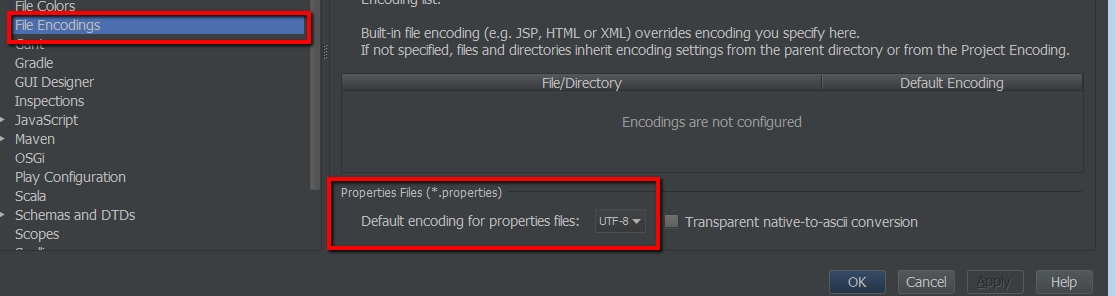
File --> Other Settings --> Default Settings --> File Encodings 
Change the value of Default encoding for properties file to UTF-8 (or another one of your choice)
Now the default encoding for all your Properties and Message bundle files in every new project will be set to the one of your choice

Maven resource filtering not working on spring configuration xml file

I recently run on a weird problem while running property filtering on tutorial project that I'm writing.

One of my configuration files (spring XML config files) was being partially filtered (only the first 2 variables were properly "filtered" while the rest was left as they were )

Below is my configuration file. Only the first 2 variables where filtered (mongo.host & mongo.port) :


I've tried a few things and realized that if I moved them around then suddenly it would work but I couldn't put my finger on what was causing the problem

So I decided to remove line by line from the bottom up and check if something will fix the problem

As it turns out what was causing the problem was the '@' in my comment right before the repository configuration.

This actually was a maven bug in the maven-resources-plugin but fear not the bug was corrected in the 2.6 version

So if you come up by this behavior check your pom.xml configuration as by default my maven was using the 2.4.1 version and change it in the build section of your POM to use the more recent version


...

...
    
            
                org.apache.maven.plugins
                maven-resources-plugin
                2.6
            
   
...


...

OSX show used ports or listening applications with their PID

On OSX you can display applications listening on a given port using the lsof the commands described below will show listening application...